Features
Scheduling & reminders
Every entry on your schedule, surfaced on time.
Build recurring schedules for anything you track and let reminders surface each entry at the right moment. Optimized handles daily, every-other-day, weekly, and custom cadences without spreadsheets or guesswork, and keeps a clean record of what was logged and when.
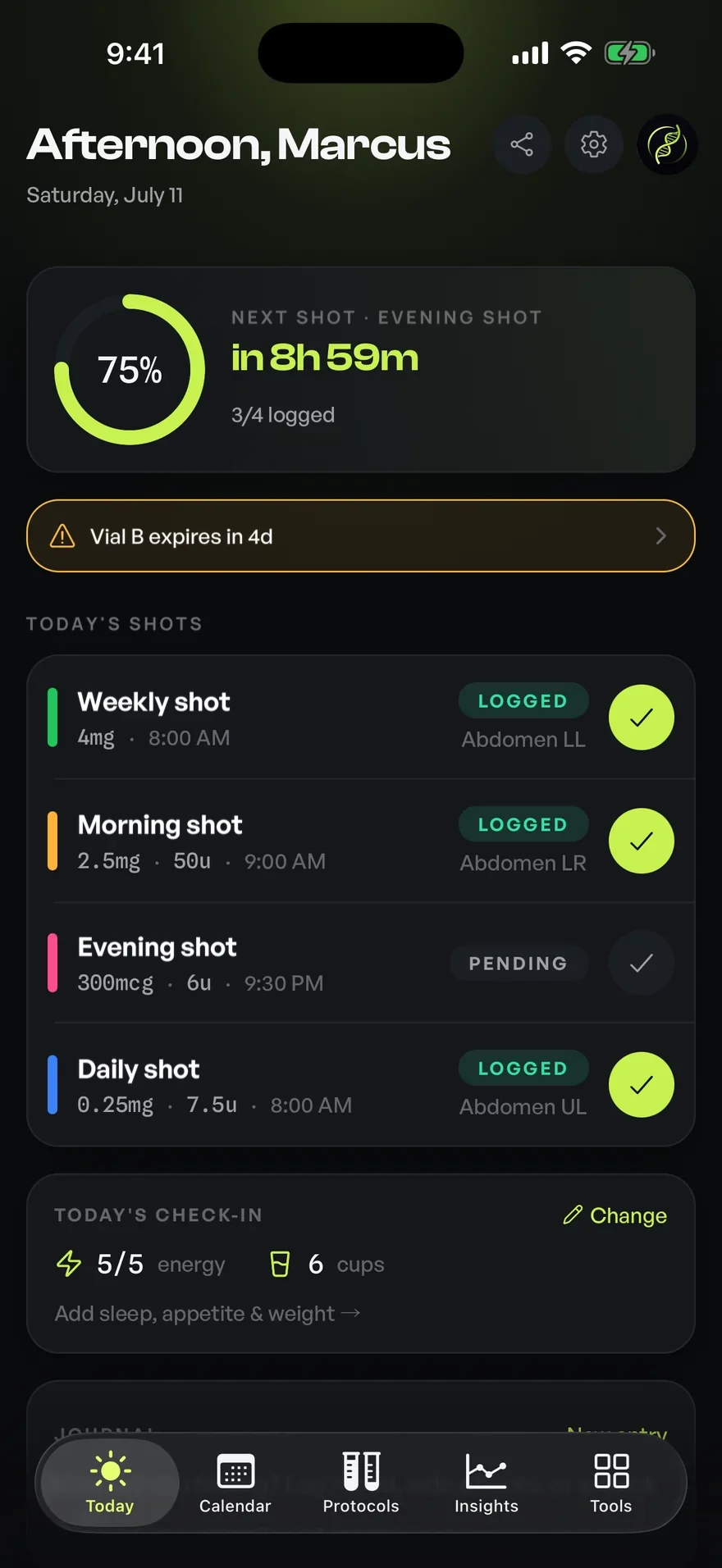
01Scheduling
Recurring schedules that match how you actually take them
Real schedules rarely fit a single rhythm. One entry is every morning, another twice a week, a third every third day, and a fourth only on training days. Optimized lets you define each schedule independently, then assembles them into one coherent timeline so you can see the full week at a glance rather than holding it in your head.
Each schedule is its own object: a cadence, a time window, and the item it belongs to. You can run several schedules in parallel, pause one without disturbing the others, and adjust a cadence when your plan changes. The timeline recalculates automatically. The result is an organized view of what is due, what is upcoming, and what has already been recorded.
Reminders if you want them, not a wall of notifications
Reminders are designed to be useful rather than noisy. Each scheduled entry can carry its own reminder time, and Optimized groups same-window items together so you get a single, legible nudge instead of a scattered pile of alerts. When you act on a reminder, the entry is marked and removed from the day's outstanding list.
Because reminders are tied to the schedule rather than a fixed clock, they move with your plan. Shift a weekly item to a new day and its reminder follows. Skip a day intentionally and the record reflects that choice, so your history stays accurate instead of silently drifting out of sync.
A timeline you can trust for organization
The Today view collects everything due, in order, with clear status on each item: outstanding, logged, or skipped. Looking ahead, a forward view shows the coming days so you can plan around travel, schedule conflicts, or a change in routine before it arrives rather than discovering a clash on the morning of.
Every action writes to a tidy, timestamped history. That record is for your own organization and recall: a precise, chronological account of what you scheduled and what you marked complete, kept in one place instead of across notes apps, calendars, and memory.
Flexibility for the days that don't go to plan
Schedules accommodate the real world. You can move a single occurrence without rewriting the whole pattern, skip an entry and note it, or reschedule on the fly when life intervenes. The underlying recurring rule stays intact, so one exception never forces you to rebuild your setup.
Time-zone handling keeps your timeline coherent when you travel, and at-a-glance status colors make it obvious where you stand for the day. The goal is a calm, accurate picture of your routine: structure when you want it and slack when you need it.
02How it works
- 01Add an item you want to keep on schedule and choose its cadence: daily, weekly, every-other-day, or a custom pattern.
- 02Set a reminder time, or let same-window items group into a single daily nudge.
- 03Each day, the Today view lists what's outstanding in order; mark entries as you go.
- 04Skip, move, or reschedule any single occurrence without disturbing the recurring rule.
- 05Review a clean, timestamped history of everything you've scheduled and logged.
03Who it's for
- Weekly entries where a consistent day is easy to lose track of
- Several entries on different recurring schedules
- Schedules that mix daily, weekly, and every-few-days entries
- Anyone juggling supplements and reminders who wants one reliable timeline
04Works well with
05Questions
Good to know
Every entry, logged.
Free on iOS and Android. Bring scheduling & reminders and every other feature into one precise, organized app.


For informational and personal tracking purposes only. Not medical advice. Consult a licensed healthcare professional.