Features
Site rotation map
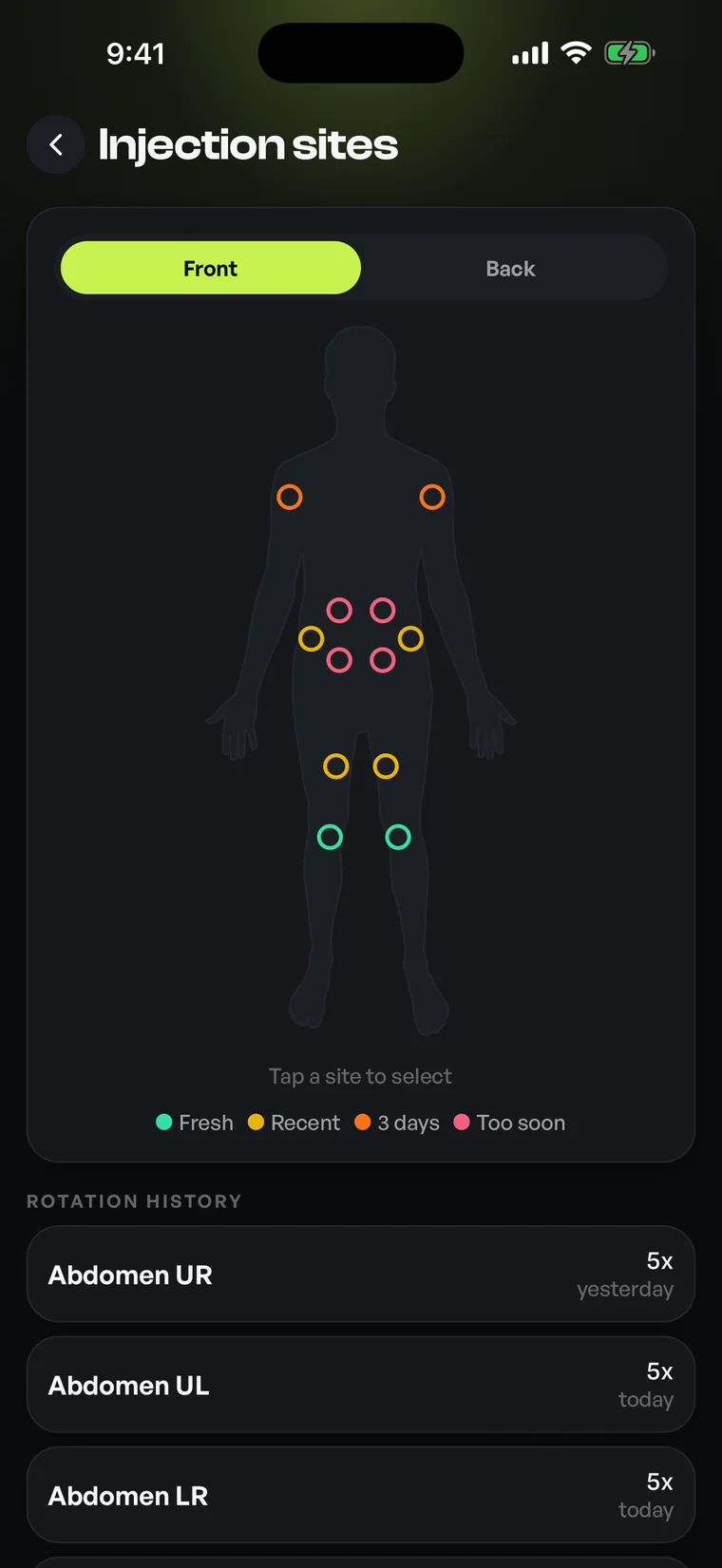
An interactive body map that tracks where you logged last.
Optimized turns site rotation from a mental note into a visual record. An interactive body map shows which sites you've recently used and which have had time to rest, so your rotation stays organized and easy to recall, purely as a tracking aid.
01Site rotation
A visual record of where you've logged
Keeping track of rotation in your head is error-prone, and paper notes get lost. The site map replaces both with a clear, tappable diagram of the body. Each time you record an entry against a site, the map remembers it, building an at-a-glance picture of your recent pattern.
Sites are shaded by how recently they were used, so the map reads instantly: darker or marked regions are recent, lighter regions have had longer to rest. Instead of trying to remember last week's pattern, you simply look at the map and see it laid out.
Front, back, left and right: the whole body in view
The map covers common regions across the body and distinguishes left from right, so a site on one side is tracked separately from its mirror. You can rotate between front and back views to log and review the full set of locations you use, keeping everything in a single, consistent reference.
Tapping a region records an entry there and ties it to the rest of your log, so a site selection is part of the same timestamped history as everything else you track. Over time this becomes a faithful map of your own habits rather than a guess.
Suggestions that keep rotation organized
Because the app knows which sites you've used and when, it can highlight which areas have rested longest, a simple organizational cue to help you keep rotation even. This is presented as information about your own history, not as medical instruction: you remain in control of every choice.
The point is reducing friction. Instead of pausing to reconstruct where you've been, you open the map, see the rested regions surfaced, and make your own decision quickly. It's the difference between a system that remembers for you and one you have to remember for.
History you can actually review
Every site entry feeds a chronological log you can scroll back through. That makes it easy to review your rotation over a week or a month, spot a region you've leaned on, and rebalance. All from records you created, kept in one place.
Combined with scheduling, the site map closes a common gap: knowing what's due is one thing, knowing where you last logged is another. Optimized keeps both organized side by side so your routine feels deliberate rather than improvised.
02How it works
- 01Open the interactive body map and switch between front and back views.
- 02Tap the region you're logging; the entry is recorded with a timestamp.
- 03The map shades sites by recency so recent and rested areas are obvious.
- 04Rested regions are surfaced as a cue to help keep your rotation even.
- 05Scroll the history to review your pattern over days or weeks.
03Who it's for
- Anyone who logs on a schedule and wants even site rotation
- Entries tracked left and right across several regions over time
- Anyone who wants a clear site record instead of guessing
- People who want a tidy visual history of where their last entry went
05Questions
Good to know
Every entry, logged.
Free on iOS and Android. Bring site rotation map and every other feature into one precise, organized app.


For informational and personal tracking purposes only. Not medical advice. Consult a licensed healthcare professional.